


How to Reset Your Instagram Algorithm Signals and Improve Your Reach
Learn how to reset your Instagram algorithm in a few taps, retrain your signals, and turn a cleaner feed into better reach for your content in 2026.
Table of Contents
Your Instagram feed has a long memory. Every like, comment, save, and half-watched Reel from the past few years is still shaping what you see today, which is why your recommendations can feel stuck in a version of you that no longer exists.
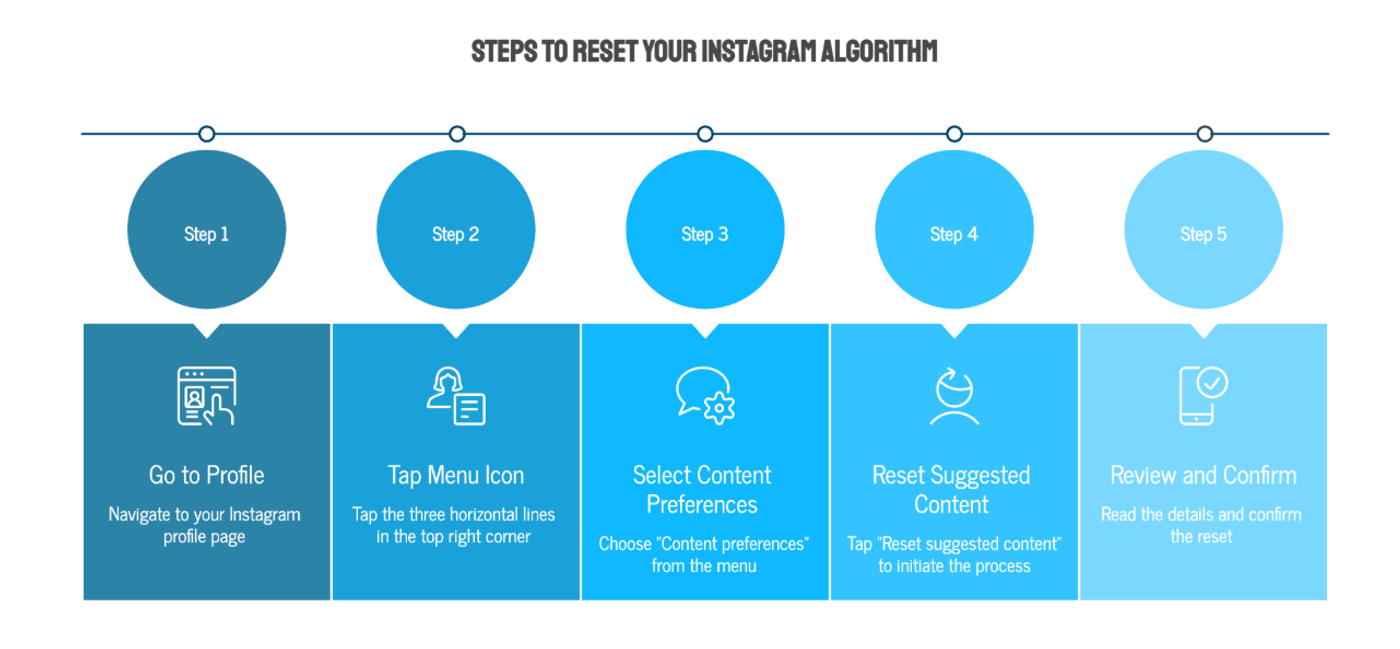
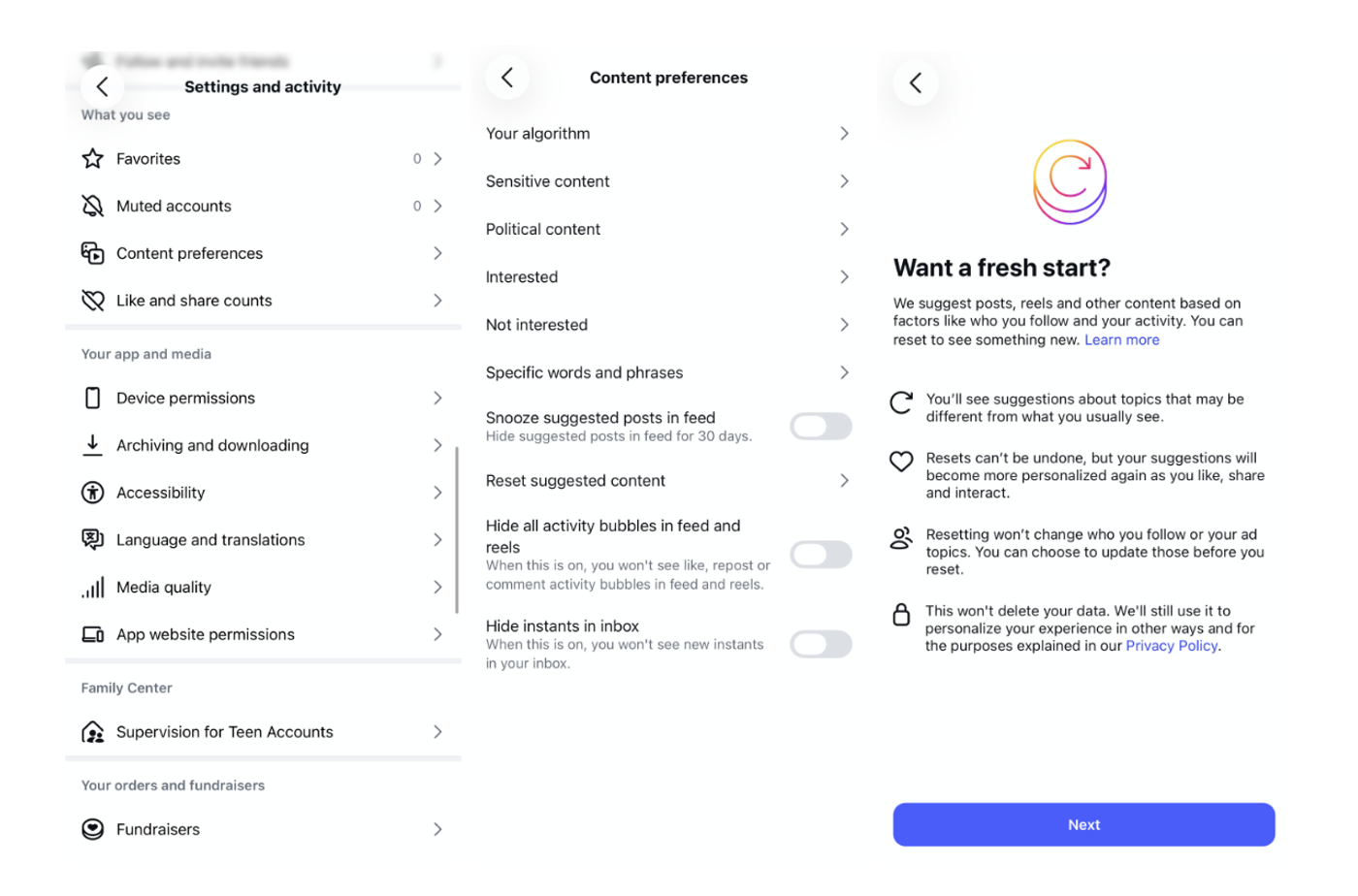
You can reset the Instagram algorithm in about five taps: go to your profile, open the menu, tap Content preferences under “What you see,” select “Reset suggested content,” and confirm. From there, Instagram rebuilds your recommendations based on what you do next.
This guide covers the official reset, what it does and doesn't do, and how to retrain your signals so the reset actually pays off.
What Does Resetting the Instagram Algorithm Actually Do?
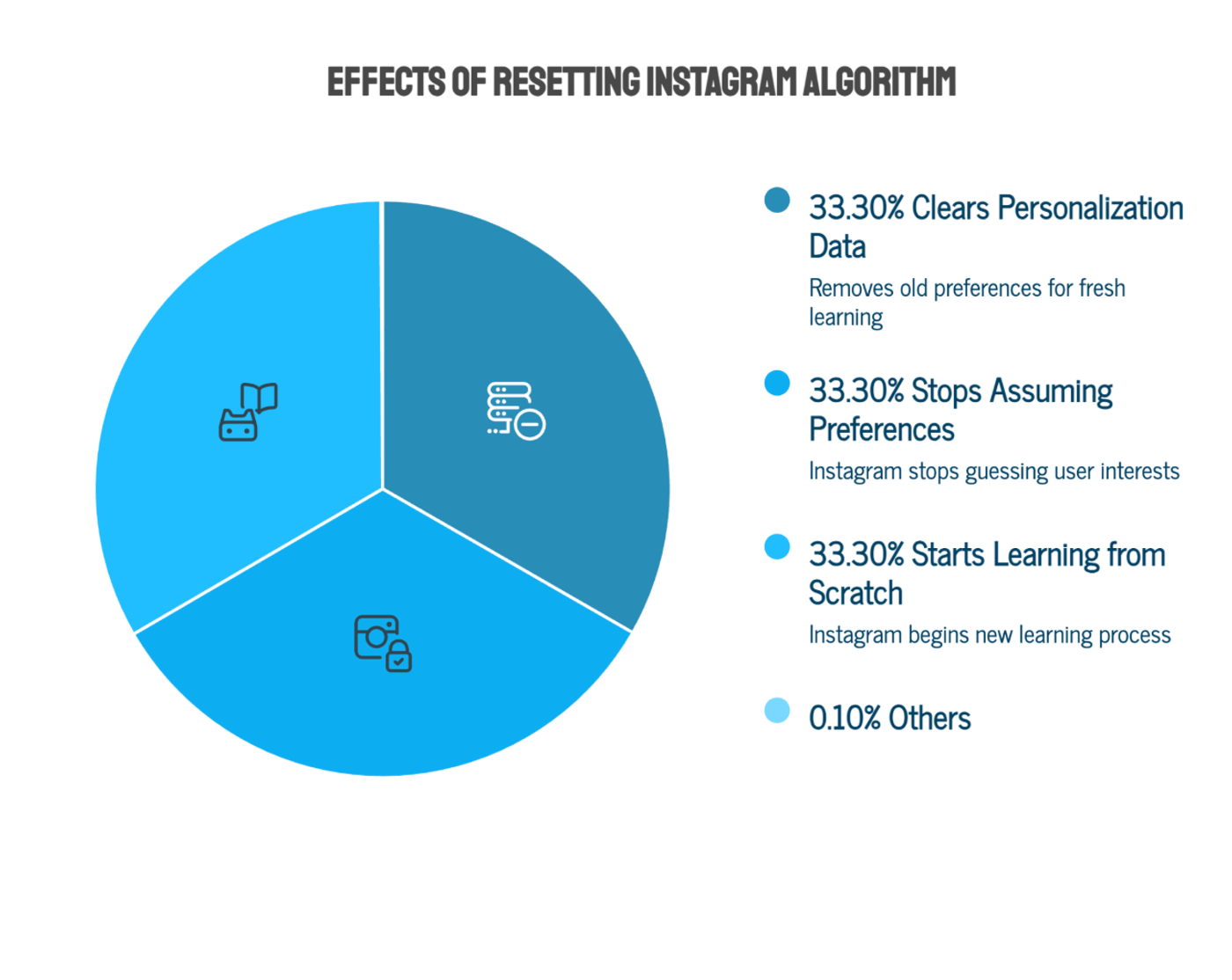
The reset clears the personalization data Instagram uses to recommend content across your Feed, Explore page, and Reels. It wipes the slate on suggested content, so Instagram stops assuming it knows what you like and starts learning again from scratch.
Three things it does not do:
- It doesn't delete your account data. Your posts, followers, DMs, and history all stay intact. Meta also keeps the underlying data under its normal privacy policy; the reset just stops old patterns from steering recommendations.
- It doesn't turn off suggested content. You'll still see recommendations, they'll just be chosen fresh instead of based on years of accumulated signals.
- It can't be undone. Once you confirm, there's no restore button, so treat it as a one-way door.
How Do You Reset Your Instagram Algorithm Step by Step?
The feature works the same way on iPhone and Android:
- Go to your profile and tap the menu icon in the top right corner
- Tap Content preferences
- Tap Reset suggested content
- Review the details, then confirm the reset
During the process, Instagram also prompts you to review the accounts you follow and unfollow any that no longer fit.
While you're in Content preferences, you can also mute posts containing specific words and phrases, and you can temporarily hide suggested posts from your feed entirely if you want a break from recommendations altogether.
If your account has been posting in a completely different niche for years, starting a new account may also be worth considering. Unlike TikTok, Instagram places much more weight on long-term account history, follower relationships, and past engagement patterns. While resetting your suggested content can improve your recommendations, it won't erase years of algorithm signals tied to your account.
For creators making a significant niche change, a fresh account can sometimes reach the right audience faster than trying to retrain an existing one.
Why Would a Creator or Brand Want to Reset Their Algorithm?
For creators and social media managers, the reset is a working tool:
- Your niche changed and your feed didn't. If you pivoted from fitness content to food content, your Explore page is still showing you last year's niche, which makes trend research slow and noisy.
- You need a clean read on your category. A fresh algorithm shows you what Instagram pushes to a neutral viewer in your space, before your personal habits skew the sample. That's the closest thing you'll get to seeing your niche the way a new follower sees it.
Want to put this into practice?
SideShift connects you with vetted UGC creators who actually deliver. Start your free trial and post your first job in under 10 minutes.
- Doomscroll content took over. Passive signals count. Lingering on rage bait teaches Instagram to serve more of it, and that junk crowds out the competitor and trend content you should be studying.
- Your engagement habits got lazy. Months of random liking sends muddy signals. A reset lets you rebuild deliberately.
Resetting the algorithm changes what you see, not directly what your followers see. The reach benefits come from what you do after the reset.
How Do You Retrain Your Instagram Algorithm to Improve Your Reach?
We call this account warming.
Instagram learns from every action you take from what you post, to what you watch, save, share, search for, and engage with. If your Explore page is filled with content outside your niche, or your own content is reaching the wrong audience, you need to start sending clearer signals.
After you reset your suggested content, it's time to rewarm your account.
Spend 15-20 minutes per day for one to two weeks deliberately engaging with content in your niche before you focus on publishing.
Search Within Your Niche
Search keywords related to your content and engage with the results. Watch Reels to completion, save valuable posts, leave thoughtful comments, and share useful content. Do this across several searches each day instead of relying on your Home feed.
Clean Up Your Explore Page
Spend 10-15 minutes watching and engaging with niche-relevant Reels. Skip content that isn't relevant so Instagram gradually replaces it with topics you actually care about.
Follow Relevant Creators
Follow a handful of creators in your niche each day. Before following, spend a few minutes watching their content, saving posts, and leaving genuine comments.
Be Consistent
Open Instagram several times throughout the day and engage with niche content before posting. Consistent signals over one to three weeks will retrain your feed far more effectively than a single long session.
The retraining logic works from both directions. As a viewer, deliberate engagement rebuilds a feed that functions as a research tool. As a creator, the same signal system is ranking your posts for other people, so everything in that table is also a checklist for the content you publish: make posts worth saving, hold watch time in the first two seconds, and prompt real comments instead of emoji drops.
Give it time. The Explore page and Reels adapt within days because they lean on recent activity, while your main feed shifts more slowly since it also weighs long-term relationships. Expect one to three weeks before the new signals fully settle.
If part of your reach problem is finding the right accounts to learn from after a reset, our guide on how to find Instagram influencers breaks down how to map the creators worth following in any niche, and our look at micro influencers explains why smaller accounts often make better signal sources than celebrity ones.
Want to put this into practice?
SideShift connects you with vetted UGC creators who actually deliver. Start your free trial and post your first job in under 10 minutes.
Does Better Reach Actually Lead to Brand Deals?
Yes. Higher reach is valuable because it shows brands that your content consistently resonates with an audience. However, engagement rate is often a stronger indicator of how actively your audience interacts with your content and how likely they are to trust your recommendations.
On Instagram, brands often evaluate your recent content performance alongside your profile as a whole. If your reach has steadily declined because your account has drifted away from your niche or your audience signals have become muddled, resetting and retraining your algorithm can help your content reach more relevant viewers again. Better reach often leads to stronger engagement, giving brands more confidence that a sponsored post will perform.
On TikTok, the equation is different. Your hook matters more than your follower count. Individual videos have much greater viral potential, so follower count and historical reach generally carry less weight. A creator with a smaller or newer account can still land sponsored opportunities if they consistently produce engaging content.
UGC is different altogether. When brands hire UGC creators, they're paying for content assets, not access to the creator's audience. The videos are typically published on the brand's own social channels or used in paid advertising, so your follower count and personal reach matter far less.
Instead, brands look for creators who can produce high-quality content at scale. A creator who consistently delivers dozens of authentic, well-performing videos is often more valuable than someone with a large following but limited production capacity. Strong organic reach is still a positive signal of content quality, but for UGC, your portfolio, creative skills, reliability, and ability to produce volume usually carry more weight than your audience size.
Ultimately, resetting your Instagram algorithm won't instantly land you partnerships, but it can help your content reach the audience it's meant for. Whether you're pursuing influencer campaigns or building a UGC portfolio, consistently creating content that people watch, save, share, and engage with is what opens more opportunities.
Turn Your Content Into Income on SideShift
Resetting your Instagram algorithm can help your content reach the right audience, but your success on Instagram and earning potential as a creator isn't determined by follower count and reach alone.
Brands use SideShift to find influencers, UGC creators, and brand ambassadors for a wide range of campaigns. Whether your value comes from your audience, your content creation skills, or both, SideShift makes it easy to discover opportunities and manage every collaboration from application to payment.
FAQs
1. Does resetting the Instagram algorithm delete my followers or posts?
No. The reset only clears the signals Instagram uses for suggested content. Your account, posts, followers, messages, and analytics are untouched.
2. How long does it take for the Instagram algorithm to rebuild after a reset?
Explore and Reels start adapting within a few days because they rely on recent activity. Your main feed takes longer, usually one to three weeks, since it also factors in long-term relationships.
Want to put this into practice?
SideShift connects you with vetted UGC creators who actually deliver. Start your free trial and post your first job in under 10 minutes.
3. Will resetting my Instagram algorithm increase my reach?
Not by itself. The reset changes what you see, not what your followers see. Reach improves when you use the fresh start to research your niche and publish content that earns saves, shares, and watch time.
4. Can I undo an Instagram algorithm reset?
No. Instagram confirms the reset is permanent before you complete it. Your recommendations rebuild from your new activity, so there's no way to restore the old personalization.
5. How often should I reset my Instagram algorithm?
Rarely. Reset when your niche or interests genuinely change, or when your feed has drifted badly off course. Frequent resets prevent Instagram from ever learning enough to recommend well.