
How to Reset Your TikTok Algorithm: A Step-by-Step Guide
Not getting views on TikTok? Learn how to reset the TikTok algorithm, fix your For You Page, and improve reach with proven creator tips.
Table of Contents
Your TikTok feed is off. Your For You Page isn’t hitting anymore. You’re seeing content you don’t care about, your UGC videos aren’t being shown to the right audience, and engagement feels stuck. Maybe you’re testing a new niche, joining a campaign, or just trying to fix an account that drifted in the wrong direction.
The good news? You don’t need to delete your account and start over.
You can reset your TikTok algorithm and, more importantly, retrain it without losing your profile, followers, or momentum.
This guide walks through exactly how to do that, using account warming, a proven method SideShift recommends to help creators get better reach, faster growth, and stronger performance from day one.
What Does “Resetting” the TikTok Algorithm Actually Mean?
TikTok doesn’t have a single “reset” button for your algorithm. Instead, the algorithm learns from your behavior over time: what you watch, what you engage with, what you ignore, and how long you stay on certain videos.
Resetting your TikTok algorithm really means retraining it.
To “reset” your algorithm, you’re teaching TikTok:
- What content you want to see
- What niche you belong in
- Who your videos should be shown to
What Is Account Warming (And Why It Works)
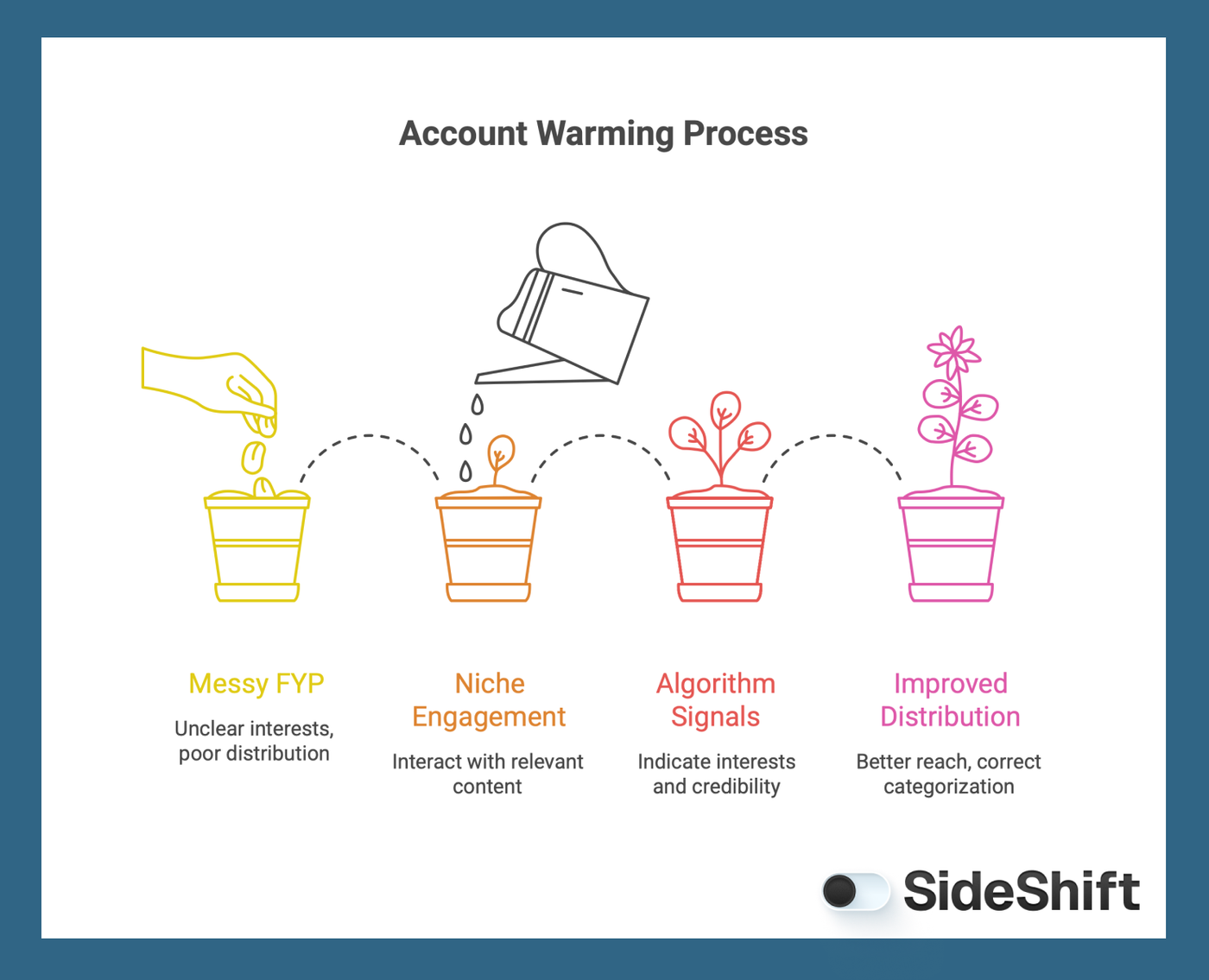
Account warming is the process of intentionally engaging with niche-relevant content before you start posting consistently. This sends strong signals to TikTok’s algorithm about your interests, credibility, and category placement.
SideShift uses this exact process to help creators:
- Fix messy FYPs
- Enter new niches without starting over
- Improve early video distribution
- Avoid shadowed or miscategorized content
Skipping account warming when you first start, or doing it incorrectly, often results in weak reach and forces creators to reset their accounts. Retraining your TikTok algorithm takes time, but it’s absolutely possible. The same warming principles also work when you’re refreshing an existing account or retraining your FYP after a content shift.
Step 1: Hard Reset Through Settings
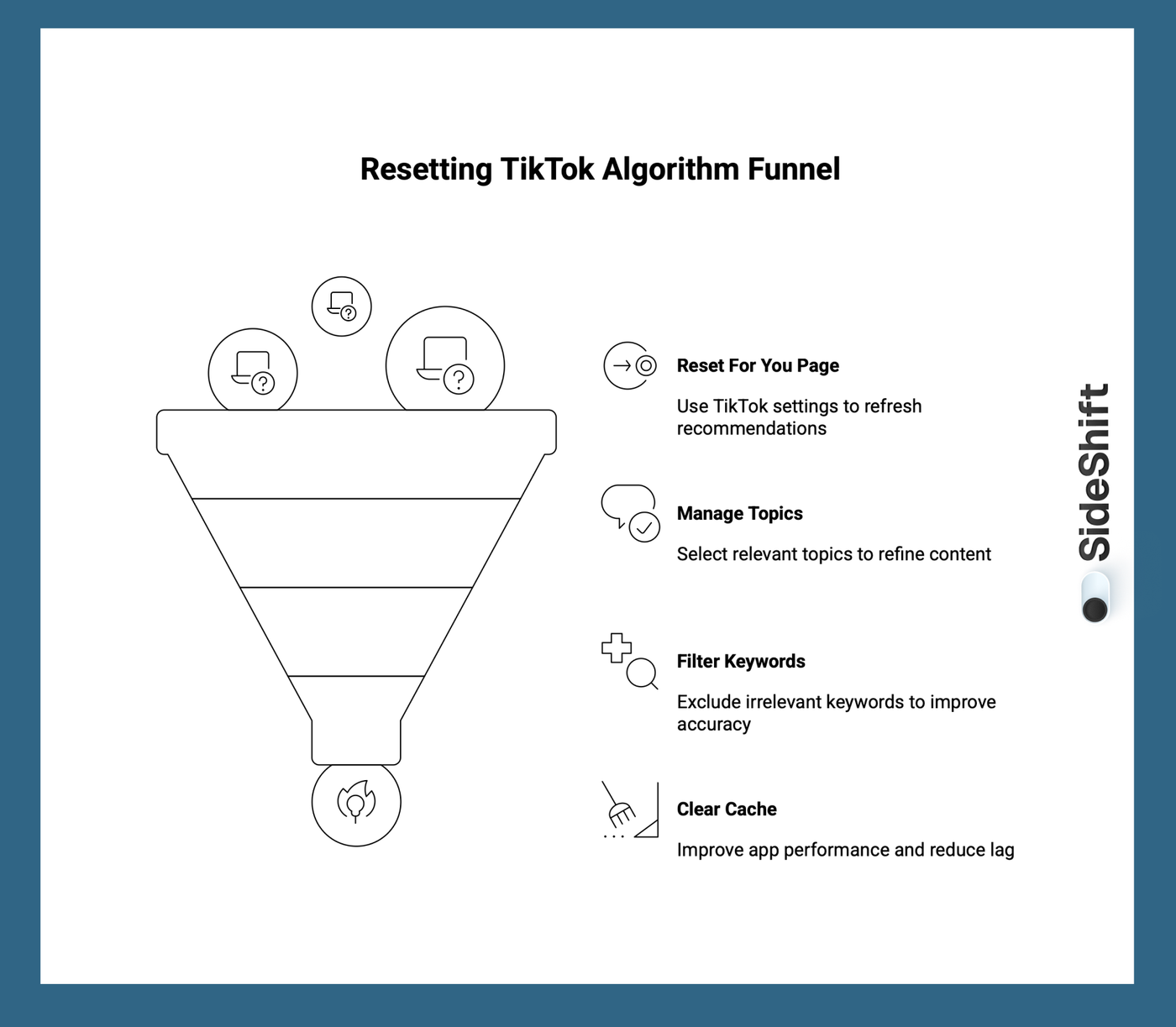
1. Reset Your For You Page Using TikTok Settings
If your current For You Page is completely off, start with TikTok’s built-in reset feature. This gives the algorithm a fresh signal without deleting your account or losing followers.
- Go to Settings and Privacy
- Tap Content preferences
- Select Refresh your For You feed
This reset clears TikTok’s recent recommendation signals while keeping your follows, saved videos, and account settings intact. It’s especially useful if you’ve been engaging with content outside your niche or want to realign your feed before a new campaign or content direction.
You can also use the “Manage topics” and “Filter keywords” tools in Settings and Privacy to further niche out content that is not relevant to your page. This helps TikTok understand your interests more accurately and speeds up the retraining process.
If you’re trying to retrain an existing account, this step should come before you begin account warming. Think of it as clearing the slate so TikTok can relearn your preferences more accurately.
2. Clear Your Cache to Support Algorithm Accuracy
In addition to refreshing your feed, clearing your app cache can help improve how TikTok serves recommendations.
Want to put this into practice?
SideShift connects you with vetted UGC creators who actually deliver. Start your free trial and post your first job in under 10 minutes.
- Go to Settings and Privacy
- Tap Free up space
- Clear your cache
This won’t affect your drafts or posted content, but it can improve app performance and reduce recommendation lag. Many content creators make this part of their weekly maintenance to keep their FYP responsive and aligned with their interests.
Step 2: Reheat Your Account With Intention
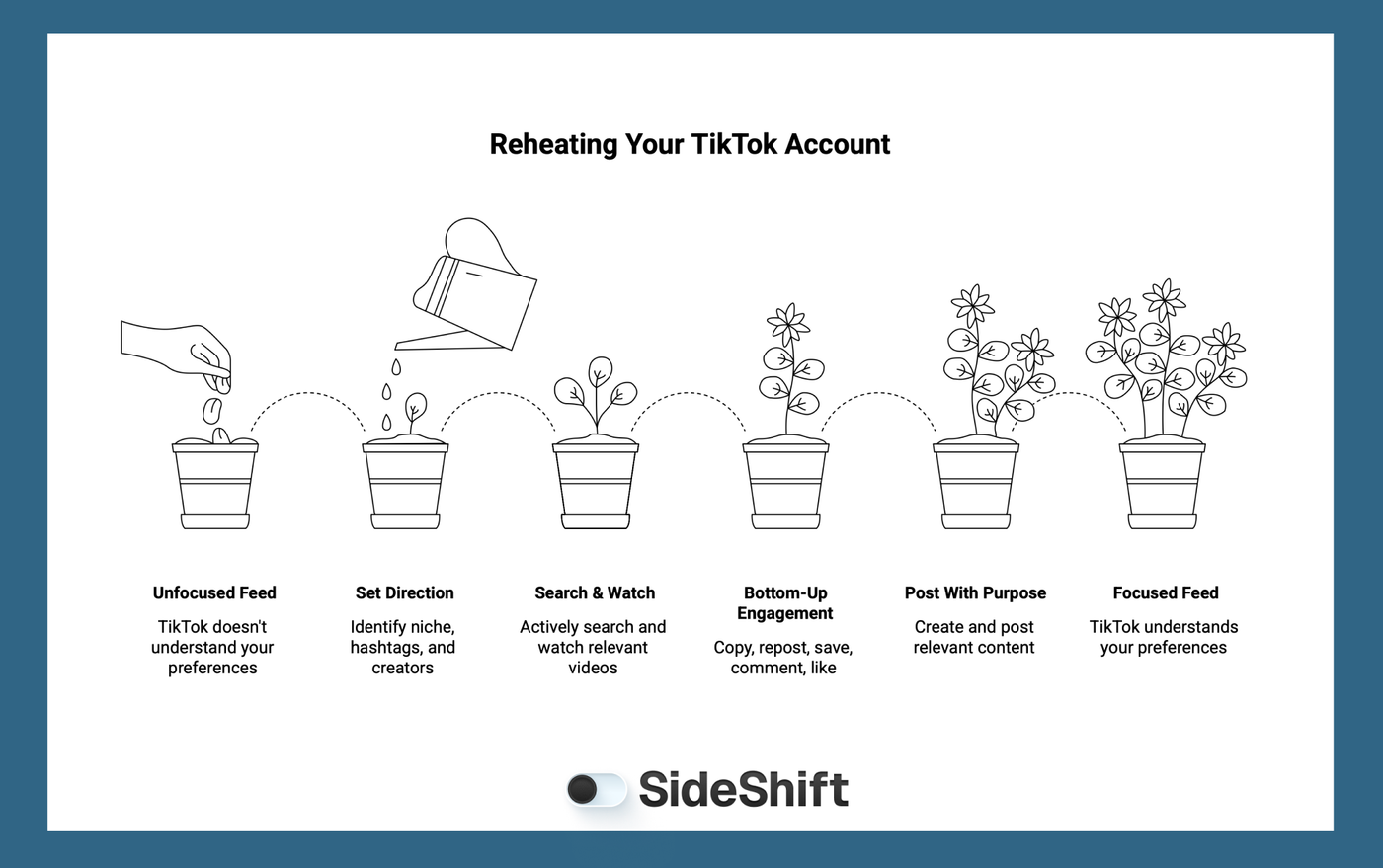
Once your feed is refreshed, it’s time to re-warm your account so TikTok understands what content you want to see and who should see you.
Before engaging, take a few minutes to set direction:
- Identify your primary niche and content focus
- Make a short list of relevant hashtags and topics
- Find 5 - 10 creators already performing well in your space
- Update content preferences to remove unrelated topics
This preparation helps you engage with purpose instead of passively scrolling, which speeds up the retraining process.
1. Search & Watch to Retrain the Algorithm
Go straight to the TikTok search bar and search for topics related to your niche or the type of content you want to create.
For example:
- UGC creators → “UGC creator tips,” “TikTok brand deals.”
- Fitness → “at-home workouts,” “pilates routine.”
- Beauty → “GRWM,” “skincare routine.”
What to do:
- Watch videos all the way through
- Spend about 30 minutes total (two 15-minute sessions work)
- Avoid fast scrolling
- Do not engage with unrelated content
This tells TikTok exactly what kind of videos should populate your refreshed For You Page.
2. Use the Bottom-Up Engagement Method
After training through search, move to your For You Page and engage selectively using the bottom-up engagement method.
For videos that closely match your niche, complete the following actions in order:
Copy link → Repost → Save to Favorites → Comment → Like
Pro Tip: Only repost videos with 500K+ views or more that are highly relevant to your niche. This signals to TikTok that you’re engaging with established, high-performing content in your category.
This method builds algorithm trust, reinforces niche alignment, and positions your account as an active contributor, not a passive viewer.
Spend about 30 minutes per day doing this, staying focused on niche-relevant content only.
3. Start Posting With Purpose
After 1 - 2 days of warming or rewarming your account, you’re ready to post.
For SideShift campaigns, creators typically:
- Post 3 times per day
- Space posts at least 2 hours apart
Test a mix of formats:
- Talking to the camera
- Slideshows
- Trend-based hooks
- Short stories or POV-style content
A properly warmed account gives your videos a stronger chance of reaching the right audience immediately instead of getting buried.
Earn Brand Trust on TikTok With SideShift
Resetting your TikTok algorithm doesn’t have to mean starting from scratch. By using TikTok’s built-in refresh tools and intentionally warming your account, you can retrain your FYP, regain momentum, and position your content for better reach.
But if you’re a creator who wants to turn that improved reach into real opportunities, the next step is SideShift.
SideShift is a UGC creator marketplace that connects creators with brands looking for authentic, platform-native content, so you can monetize your TikTok growth without chasing one viral video after another.
Want to put this into practice?
SideShift connects you with vetted UGC creators who actually deliver. Start your free trial and post your first job in under 10 minutes.
If you’re ready to turn your refreshed algorithm into paid campaigns, join SideShift for free today and start getting matched with brands that want your content.
FAQs
1. Can I really reset my TikTok algorithm without deleting my account?
Yes. TikTok doesn’t require you to delete your account to reset your FYP. Using the “Refresh your For You feed” option and following intentional warming steps can retrain your algorithm without losing followers or content.
2. How long does it take for the algorithm to reset?
It usually takes 1-3 days of consistent, niche-focused engagement to see noticeable changes. For best results, combine the reset with the account warming process.
3. Will resetting my algorithm affect my current followers?
No. Resetting your algorithm affects what content TikTok recommends to you and how your content is categorized; it doesn’t remove followers or posted videos.
4. Can I reset my algorithm if I’m switching niches?
Absolutely. Account warming is especially effective when switching niches because it teaches TikTok what you want to be associated with, so your content reaches the right audience faster.
5. What if my content still isn’t getting views after resetting?
If your reach is still low, it may be a content signal issue. Make sure your videos are niche-specific, use strong hooks, and follow the warming method consistently. For creators looking to monetize, SideShift can help you connect with brands and turn your content into paid opportunities.