
How to Add Multiple Photos to Instagram Story (2026 Guide)
Learn how to add multiple photos to your Instagram Story using Layout, stickers, and the new multi-photo tools. Step-by-step guide for 2026.
Table of Contents
Want to post more than one photo to your Instagram story? You have options.
Depending on how polished you want the final story to look, Instagram has multiple ways to post more than one photo at a time. In this guide, we’ll walk through the four best ways to share multiple photos in an Instagram Story in 2026.
Option 1: Post Multiple Photos as Individual Stories
If you want to post a series of photos as separate story slides, using the “Select Multiple” tool is the most efficient way.
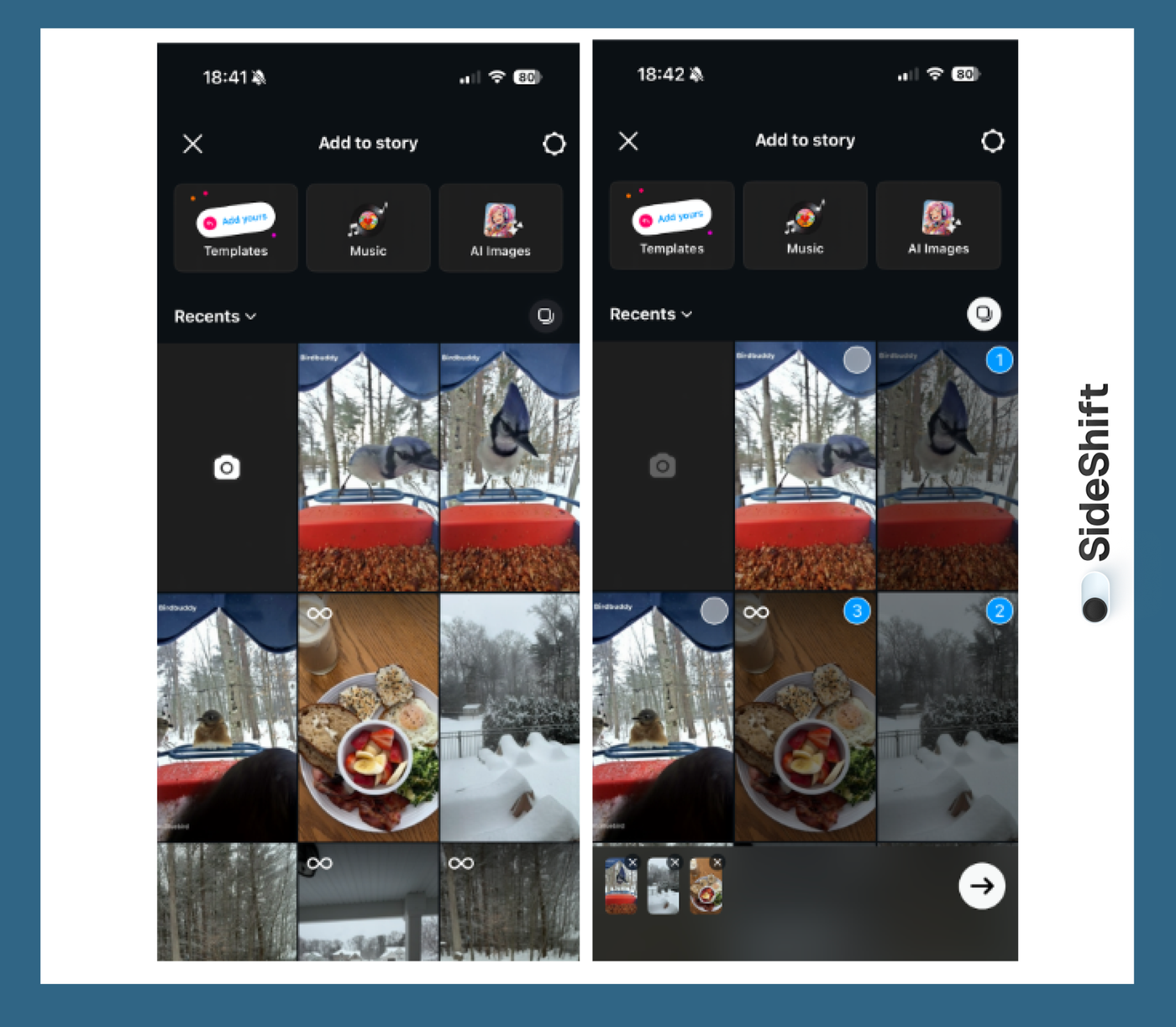
How to Use the “Select Multiple” Tool
- Open Instagram and tap the blue plus icon on your profile picture to “Add to Story.”
- Swipe up or tap the Gallery icon
- Tap “Select Multiple”
- Choose the photos you want (up to 10)
- Add stickers, text, or music
- Post
Best Use Cases
This method is perfect for:
- Product reveals
- Step-by-step tutorials
- “Day in the life” story series
- Quick UGC sequences
- Any content with a clear photo progression
It’s also the easiest method for creators who want to upload content quickly without worrying about layout design. Since Stories can be screenshotted by anyone who views them, it's worth knowing how to check if someone screenshots your Instagram Story before you post anything sensitive.
Option 2: Post One Story With Multiple Photos
If you want to put multiple photos into one story frame, Layout is the best built-in tool for the job.
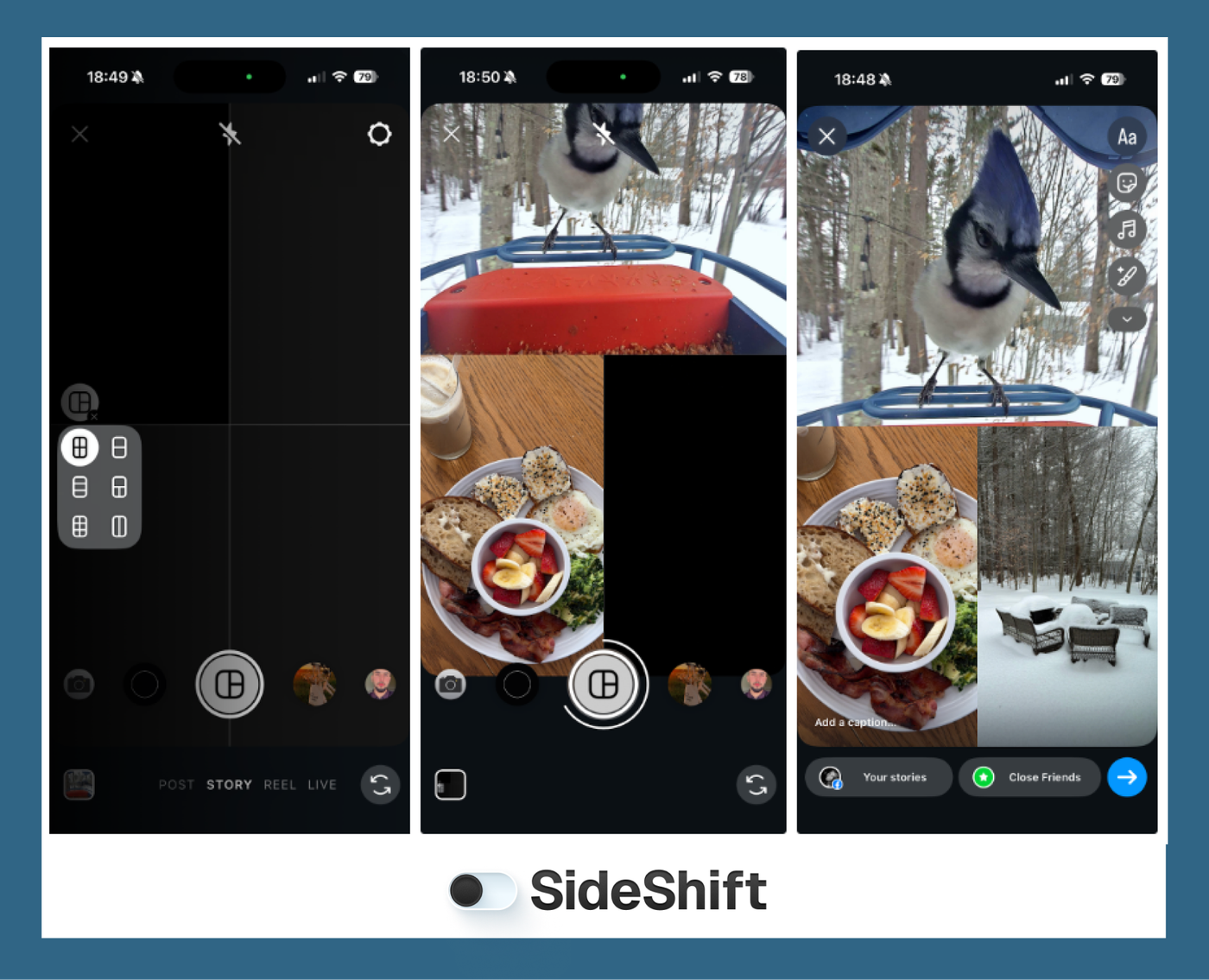
How to Use Instagram Story Layout
- Open the Stories camera
- Tap Layout
- Choose a grid style
- Add photos to each frame
- Customize with stickers or text
- Post
Best Use Cases
- Product comparisons
- Mood boards
- Multi-angle product shots
- Minimalist storytelling
Layout is ideal when you want a clean, organized story that looks intentional and designed - without needing third-party apps. It’s also great to use when you don't want to overwhelm or fatigue your audience with multiple story slides.
Option 3: Create a Collage
This is the most flexible method and the best option if you want a high-quality, brand-ready story. Creating an Instagram story collage lets you combine multiple photos into a single frame, layer visuals, and control exactly how your story looks with a unique twist. You can use Layout or a single photo as a base, then add photo stickers, cutouts, frames, text, and GIFs to build a custom design.
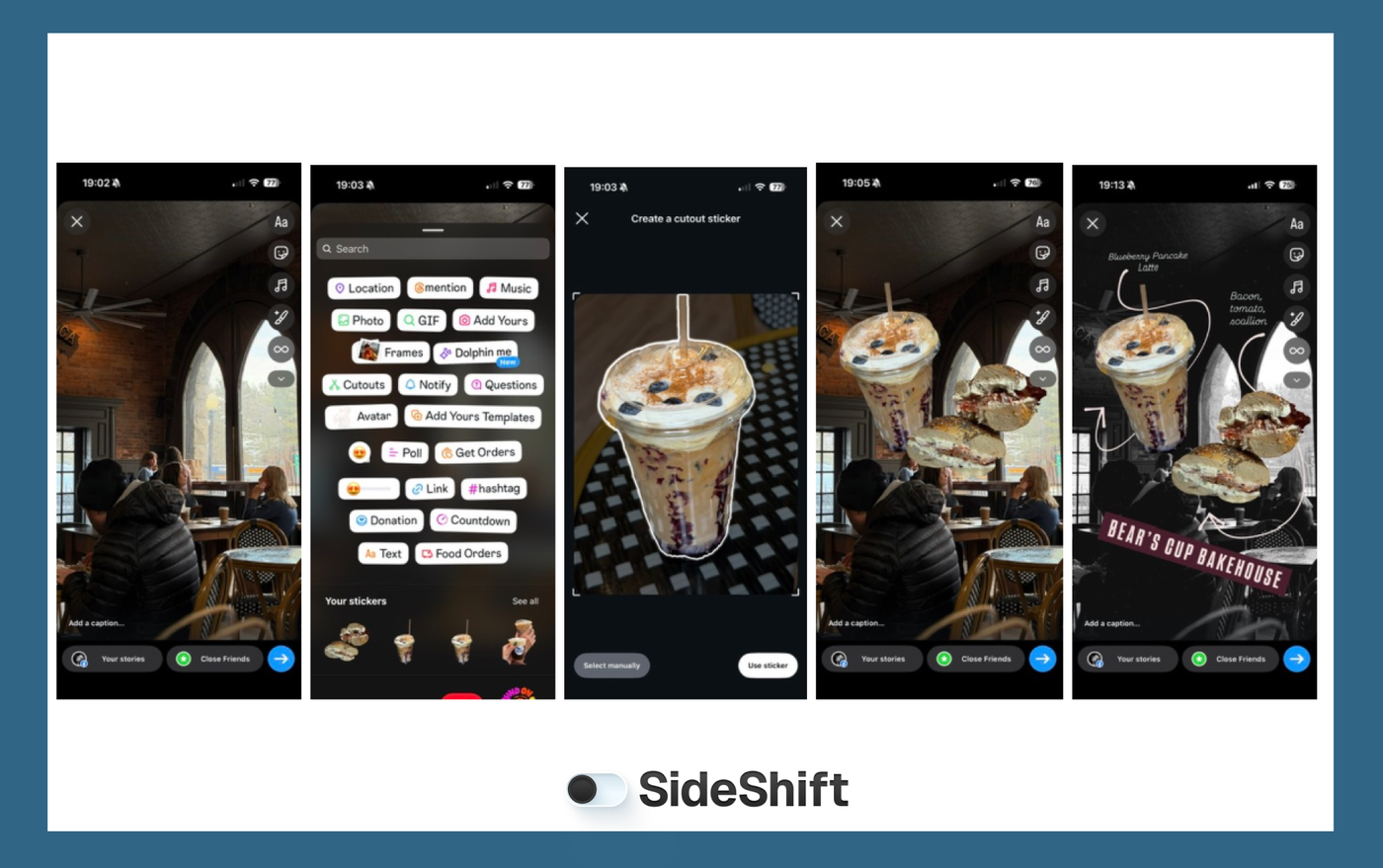
How to Build a Collage in Instagram Story
- Open Stories
- Select a base photo or use the Layout tool to create a background made up of multiple photos
- Use stickers to layer images and add cutouts for depth and variety
- Finish with text
- Post
Best Use Cases
- Product highlights showing multiple angles or features
- Before-and-after comparisons
- Step-by-step tutorials or quick how-tos
- UGC-style story ads with clear visuals
- Mood boards or aesthetic storytelling
- Brand announcements or launches that need one strong slide
Collages give you more creative control than posting individual slides, while still feeling native to Instagram Stories. They also strike the perfect balance between polish and authenticity. A well-built collage looks intentional and brand-ready, but it still blends seamlessly into the Stories feed, making it ideal for UGC, story ads, and cross-platform content that needs to perform without feeling overproduced.
Want to put this into practice?
SideShift connects you with vetted UGC creators who actually deliver. Start your free trial and post your first job in under 10 minutes.
Option 4: Third-Party Collage Apps
If you want more control over design for your Instagram Stories, third-party collage apps are the way to go. These content creation tools are especially useful when you’re creating repeatable, brand-consistent Instagram Stories.
Apps like Canva make it easy to build templates that can be reused across campaigns, creators, and platforms, so every story looks cohesive, even when it’s produced at scale.
Third-party apps work best when you need advanced layouts, custom typography, or polished visuals that go beyond Instagram’s native tools. They’re commonly used for story ads, product launches, and UGC campaigns where brand consistency matters.
Another advantage is efficiency. You can design multiple story slides at once, export them, and upload them in a sequence, saving time when you’re producing high volumes of content.
Turn Story Ideas Into Content at Scale With SideShift
If you’re a brand trying to keep your Instagram Stories fresh, SideShift makes it easy to build a content engine that keeps running. Instead of creating every story yourself, you can outsource branded content to UGC creators through SideShift.
Our platform helps you recruit a team of Gen Z creators fast and manage your content army in one place - from contracts and payments to performance tracking. That means you can produce more authentic stories, more often, and distribute them across platforms without the usual overhead.
And for creators, SideShift is where you get paid to make stories. It connects you with brands that need volume and consistency. Join SideShift for free, find brand campaigns, and start earning for the content you already love creating.
FAQs
1. Can you add more than one photo to an Instagram Story at once?
Yes. You can use the “Select Multiple” tool to upload multiple photos as a series, or use Layout to add multiple photos into one story.
2. How do I make an Instagram Story collage in 2026?
You can create a collage directly in Instagram using Layout + stickers, or build it in a third-party app and upload it to Stories.
3. Can I rearrange photos after selecting multiple for a Story?
Yes. After selecting multiple photos, you can reorder them by pressing and holding the photo you want to move, then dragging it into place in the edit tray at the bottom. That said, it’s still best to select your photos in the order you want them to appear, since rearranging can be a bit finicky.
4. What’s the best grid size for Instagram Story collages?
For readability, 2-3 photos per story is usually best. Use 4-6 for mood boards or brand storytelling.
5. Can I post multiple photos in one story without using a third-party app?
Yes. Instagram’s Layout tool and photo sticker features let you create multi-photo stories without external apps.