


6 Must-Have Tools for Every Content Creator
Build your ideal creator kit with easy gear tips and learn how to turn your creator setup into real brand opportunities.
Table of Contents
Once you decide to take content creation seriously, it’s time to think about your setup. Even the best ideas can lose attention if your video looks grainy or your audio isn’t clear. Viewers today are used to polished, high-quality content, and the right tools help you match that standard.
But you don’t need a huge budget or a studio full of gadgets.
You only need 6 essential tools to make your videos look and sound professional. In this blog, we’ll break down each one and show you exactly what to start with.
Quick Overview of Content Creators’ Toolkit
Here’s a quick breakdown of the essential equipment every content creator should have in 2026
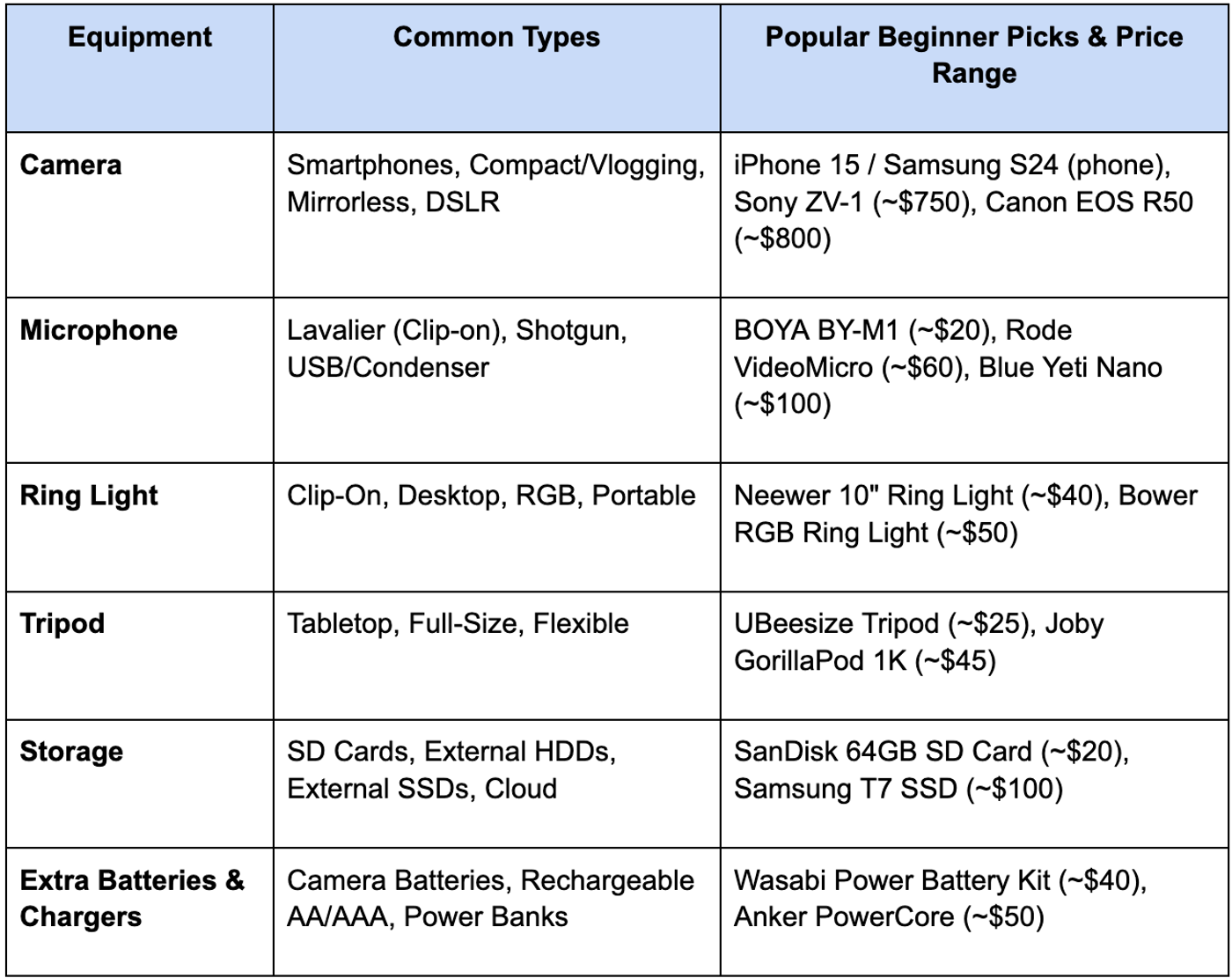
Now that you’ve got a quick overview, let’s look at each piece of equipment in more detail.
6 Equipments Every Content Creator Should Have
Each of these tools plays a specific role in helping you create content that looks clean, sounds sharp, and feels professional.
Let's start with the foundation of your content.
Camera
It’s what captures your story. But don’t worry if you’re just starting with your phone. Modern smartphones have incredible cameras that can shoot crisp, high-quality video.
When you’re ready to level up, investing in a dedicated camera gives you more creative control, like better low-light performance, background blur, and interchangeable lenses.
The kind of camera you should get depends on your goals, budget, and how you plan to create.
Here’s a quick guide to help you decide:
- Smartphones: Great for starting out. Modern phones like the iPhones or Samsung S24 shoot in 4K and have excellent stabilization. It's perfect for TikTok or Reels.
- Compact Cameras / Vlogging Cameras: Portable and beginner-friendly. Models like the Sony ZV-1 are designed for creators who want better quality and control without dealing with heavy gear.
- Mirrorless Cameras: The sweet spot for most creators. They offer interchangeable lenses, professional image quality, and lightweight bodies. Great picks include the Canon EOS R50 or Sony ZV-E10.
- DSLRs: Bulkier, but still solid for traditional setups. Cameras like the Canon Rebel T8i (around $750) are reliable and produce sharp, cinematic visuals.
Microphone
If your viewers can’t hear you clearly, they’ll scroll away even if your video looks amazing. That’s why a good microphone is one of the smartest upgrades for any content creator.
Phone mics are not enough as they pick up too much background noise and echo, especially outdoors or in echoey rooms. A dedicated mic makes your voice sound warm and focused, instantly boosting the quality of your content.
There are 3 main types of microphones:
- Lavalier (clip-on): Small, affordable, and easy to use. Great for talking videos or vlogs. Rode Wireless GO II (around $250) is a great option here.
- Shotgun Mic: Attaches to your camera or phone, captures clear audio from a distance, and reduces background noise. Perfect for outdoor or moving shots. Rode VideoMicro (~$60) is a great option here. It's compact and doesn't need any batteries.
- Condenser / USB Mic: Great for podcasts, voiceovers, or streaming from a fixed setup. Blue Yeti Nano (about $100) is perfect for this.
Want to put this into practice?
SideShift connects you with vetted UGC creators who actually deliver. Start your free trial and post your first job in under 10 minutes.
Ring Light
You won’t always have perfect natural light to shoot in, cloudy days, nighttime ideas, or dim indoor spaces can make your videos look dull.
That’s when you need a ring light. It provides even, shadow-free lighting that flatters your face, helps colors pop, and keeps your setup looking polished without bulky studio gear.
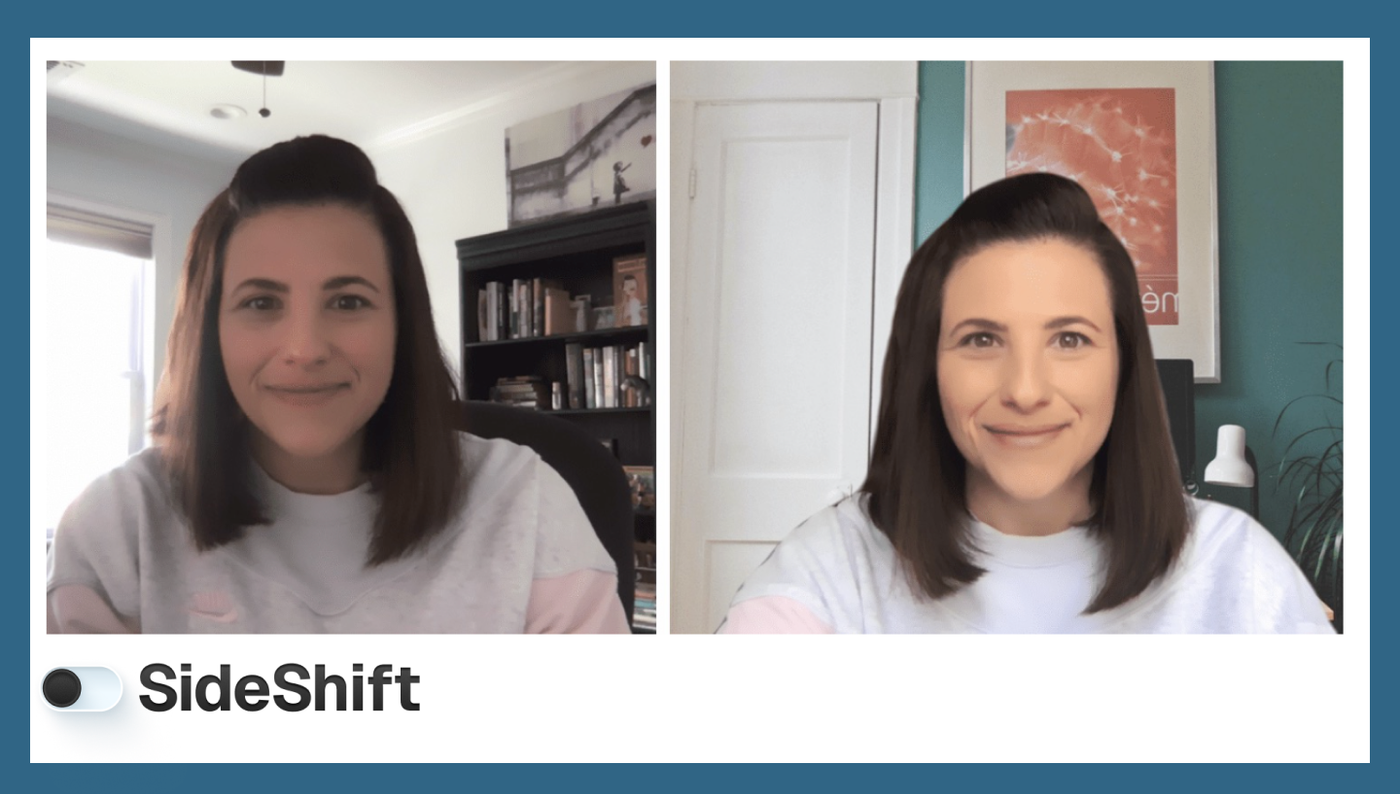
Before and after using a ring light
Most ring lights use LEDs. Here are a few common types:
- Clip-On or Selfie Ring Lights (4–6"): Great for quick mobile shoots or vlogs. Compact, USB-rechargeable, and super affordable ($10–20).
- Desktop Tripod Ring Lights (6–10"): Ideal for talking videos or makeup tutorials. Stable and adjustable ($15–40).
- RGB Ring Lights (8–12"): Add creative colored effects for gaming or ASMR content ($20–50).
- Portable Battery-Powered Ring Lights (10–12"): Perfect for creators on the go, with foldable, cordless designs ($25–60).
You’ll often find features like adjustable brightness, color temperature (warm to cool), and built-in phone holders in all types of ring lights.
Tripod
A tripod is a three-legged stand that holds your camera or phone steady while you film or take photos. It keeps your device balanced, prevents shaky footage, and allows you to record hands-free. Most tripods come with adjustable legs and a rotating head, so you can set your angle, height, and frame exactly how you want.
Types of tripods you’ll come across:
- Tabletop Tripods: Small and portable, perfect for desk setups or close-up shots.
- Full-Size Tripods: Adjustable in height, great for standing or outdoor videos.
- Flexible Tripods: With bendable legs, they wrap around surfaces or poles, ideal for travel or vlogging.
When you’re starting out, look for something lightweight and sturdy with a phone mount and adjustable head. Reliable beginner-friendly options include the UBeesize Tripod (~$25) or the Joby GorillaPod 1K (~$45).
Storage
Every piece of content you shoot needs a safe place to live. That’s where storage comes in. Having reliable storage means you won’t lose precious footage or slow down your workflow.
Types of storage you’ll use as a creator
- SD Cards: These go directly into your camera. They store your raw footage before you transfer it to your computer. Get a Class 10 or V30 card for smooth 4K video recording, brands like SanDisk or Lexar are reliable.
- External Hard Drives (HDDs): Affordable and good for large backups, but slower and more fragile than SSDs. Great for archiving old projects.
- External SSDs: Fast, small, and shock-resistant. Ideal for editing directly from the drive, perfect for creators who travel or work across devices.
- Cloud Storage: This is optional, but great for extra backups. Tools like Google Drive, Dropbox, or iCloud help you access your content anywhere.
💡 Pro tip: Keep at least two copies of your important footage. One on a drive and one in the cloud. Losing content is every creator’s nightmare, but with a good storage setup, you’ll never have to worry about that.
Want to put this into practice?
SideShift connects you with vetted UGC creators who actually deliver. Start your free trial and post your first job in under 10 minutes.
Extra Batteries & Chargers
When you start filming regularly, you’ll realize how fast batteries drain, especially when you’re shooting in 4K, using Wi-Fi/Bluetooth, or powering external accessories.
Running out of battery mid-shoot doesn’t just pause your work. It also breaks your rhythm, your lighting setup, and sometimes your creativity. That’s why pros always carry backups.
There are 3 types of batteries you might need, depending on your setup:
- Camera Batteries: Most mirrorless and DSLR cameras use proprietary lithium-ion batteries. Always get 2–3 extras, ideally from your camera brand (Canon, Sony, Nikon) or trusted third-party makers like Wasabi Power or Neewer.
- Rechargeable AA/AAA Batteries: Used for accessories like external audio recorders, lights, or transmitters. Brands like Eneloop Pro are long-lasting and recharge hundreds of times.
- Power Banks: For phone creators or when you’re filming outdoors. Look for at least 10,000–20,000 mAh with fast charging (USB-C PD preferred). Anker and Baseus are solid options.
It’s a small investment that saves time, frustration, and missed shots.
Editing Software
Editing is where your content truly comes together. This is where you trim clips, adjust colors, balance audio, and add that finishing polish that makes your video feel complete.
For beginners, free or low-cost apps like CapCut, VN Editor, or DaVinci Resolve are excellent starting points. They’re intuitive and packed with ready-to-use transitions, filters, and sound tools.
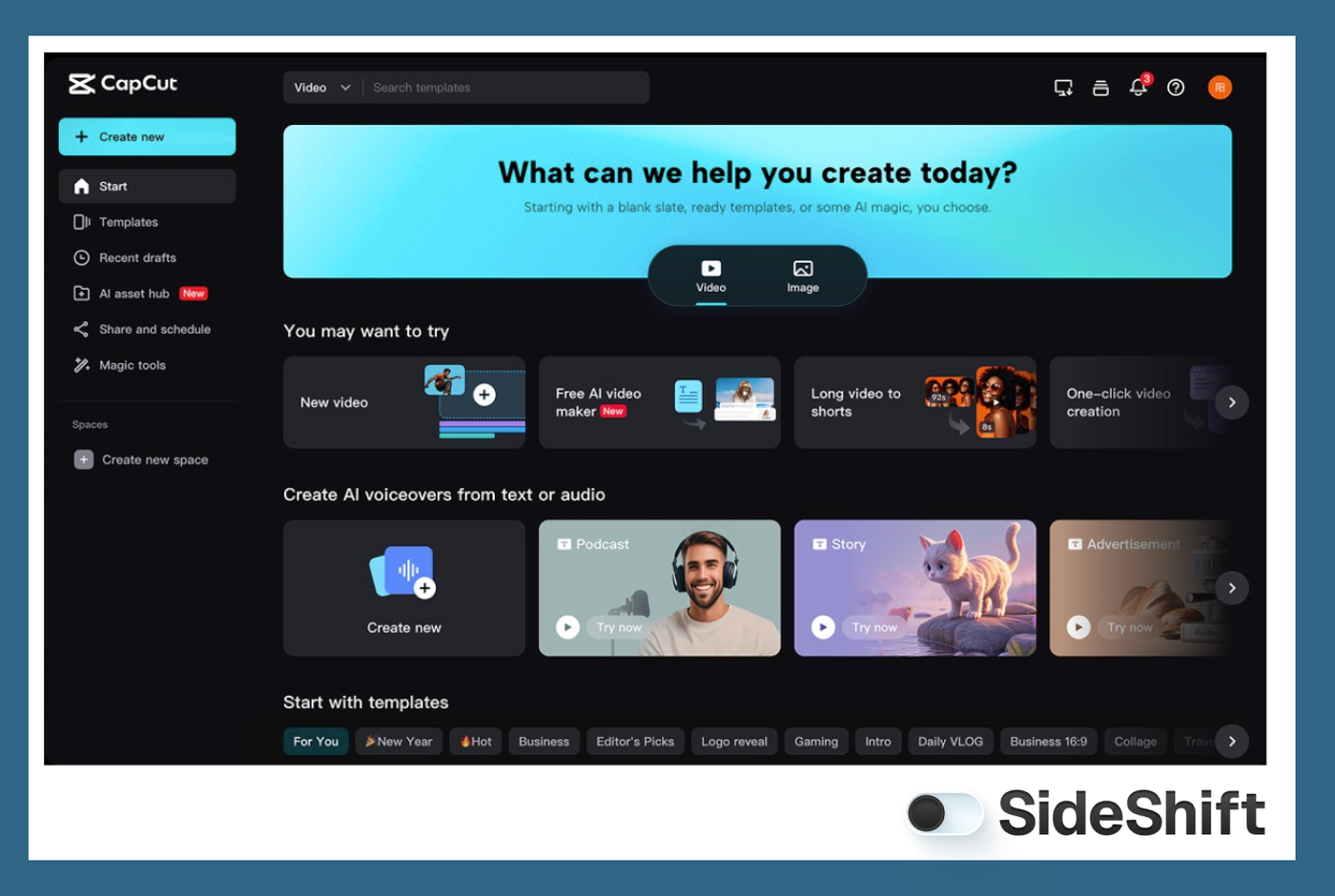
CapCut, an editing software for content creators
As you grow, professional programs like Adobe Premiere Pro or Final Cut Pro offer advanced control and flexibility for YouTube or branded content.
You don’t need to master everything at once. Start with simple cuts, text overlays, and music sync. The more you edit, the more you’ll understand your own visual style.
Turn Your Setup into Opportunities
Once you’ve built your setup and started experimenting with content, the next question is usually: Where do I find real opportunities to create for brands? That’s where platforms like SideShift come in.
Whether you’re a UGC creator, campus influencer, or just looking for flexible part-time work, SideShift connects you with brands that pay quickly.
SideShift is designed to help creators turn their skills and gear into paid collaborations. It connects you directly with brands looking for user-generated content.
Over 500,000 creators and 1,000+ brands already use SideShift, with more than $100M paid out to creators. If you’re serious about growing as a content creator, this is where you start.
Download SideShift and start your creator journey today.